
Global Settings - Midi System
Overview
This section is available only on Windows systems.
Windows's MIDI support has evolved from WinMM (Multimedia and MIDI) in Windows 3 (1991) to WinRT in Windows 8, and now to the Windows MIDI Service in Windows 11.
Each MIDI subsystem has its own program interface (API), and the plugin can connect to all three subsystems. As long as the plugin finds and remains connected to the MIDI ports, it doesn't matter which subsystem you use. From the plugin's perspective, there's no functional difference between them.
- The legacy WinMM from 1991 has been used by the plugin until now (version 4.3), but it has had trouble finding loopMIDI ports when the MIDI Service is installed. If it works for you, keep using it; otherwise, try switching to the "Modern" system.
- The "modern" system (WinRT) improves performance and supports multi-client. As of Q2, 2026, it offers the best compatibility and can access ports in loopMIDI and the MIDI Service.
- The new "MIDI Service" provides a service-oriented architecture and adds MIDI 2.0 functionality (currently unused by the plugin). Connecting the plugin directly to it works for ports created with the MIDI Service Setup tool. Note that some MIDI port names may differ slightly from other systems.
The plug-in connects to one of the systems, while software that creates MIDI ports often connects to multiple systems, possibly with different names. For instance, BOME creates the virtual port 'BMT 1' in WinMM and WinRT, but 'BMT 1 (1)' in MIDI Service.
MIDI software may have specific settings for using "Modern" or MIDI Services; for example, Cubase includes a "Use Device WinRT MIDI" checkbox in the MIDI Port Setup that improves compatibility with devices that use the modern system or MIDI Service.
Settings
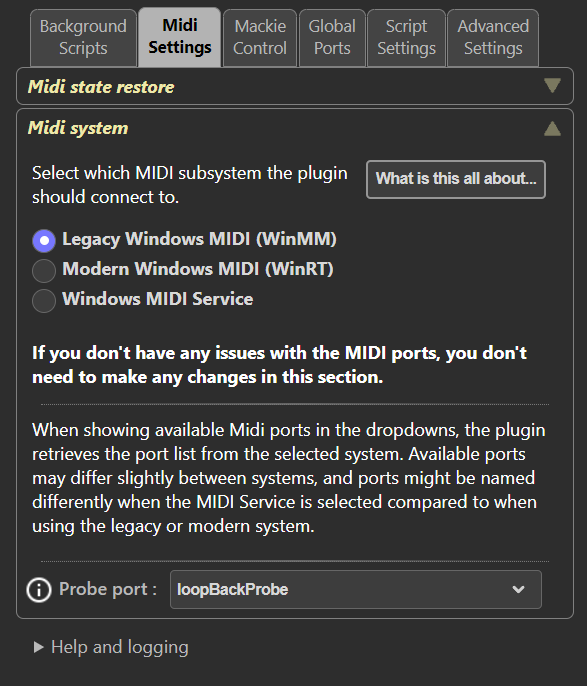 MIDI System
Select which MIDI system to connect to. The switch will be immediate upon selecting an option.
Probe port
The plugin can use a dedicated MIDI port as a probe port to verify that the current MIDI system is operational. It does so by sending a MIDI command on this port and expects to receive the same MIDI command in return on the same port. This test runs once a minute, and if it fails, the MIDI system will be reinitialized and reconnected.
The selected port should be used exclusively for this purpose and not connected to anything else. The port must be a "loopback port" created with loopMidi or a similar tool, or a "Basic loopback endpoint" created with the MIDI Service Setup tool.
Enable a probe port only if you have problems with MIDI connections suddenly becoming nonfunctional. There have been situations, especially with the new MIDI Service, where ports appear connected, and the plugin can send commands without receiving an error response, but nothing is sent. The probe port functionality aims to detect such situations and attempt to rectify them by reinitializing the port connections.